The message totals report shows the number of carrier lookups, contacts, keywords, and received and sent messages for a user account and its subaccounts. Filtered by date range, the report breaks down message usage by messaging code (Short Code, Toll-Free, or Local 10-DLC).
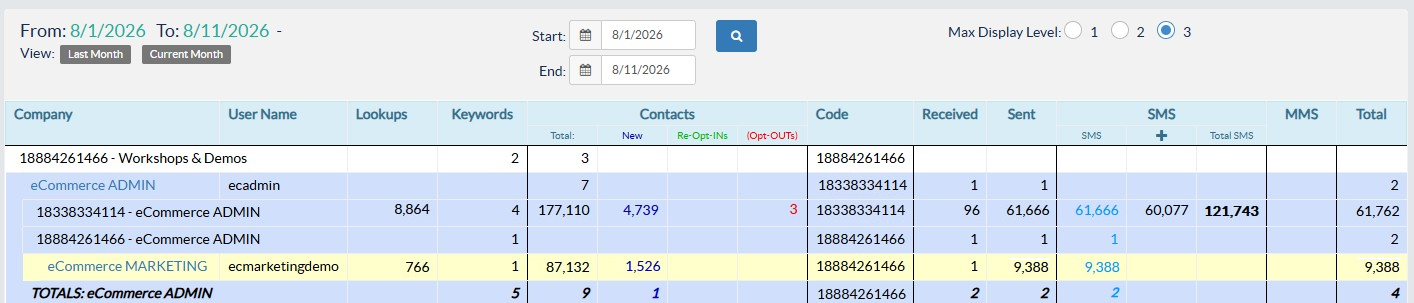
- Max Display Level - This filters the view of accounts by affiliate level.
- Lookups - The number of times the system determined a phone number's carrier and whether it is a mobile or landline.
- Keywords - The number of mobile campaigns in the account.
- Contacts - This is the breakdown of the contacts associated with the account.
- Total - Total number of contacts associated with the account.
- New - Represents the number of new contacts added to the account for the specified date range.
- Re-Opt-INs - Represents the number of contacts that opted back in to a mobile campaign after initially opting out.
- (Opt-OUTs) - Represents the number of contacts who have opted out of receiving future messages from the account.
- Code - The messaging code used to send and receive messages for the account.
- Received - The number of incoming messages the account received during the specified date range.
- Sent - The number of outgoing SMS messages sent by the account during the specified date range.
- SMS - This section is a breakdown of SMS messages sent by the account in relation to the additional segments their use requires.
- SMS - The number of SMS messages sent by the account.
- + - The number of extra SMS segments required to deliver long SMS messages, or messages with emojis (including non-standard foreign language characters).
- Total SMS - The combined total of SMS messages and extra SMS segments sent by the account.
- MMS - The number of outgoing MMS messages sent by the account.
- Total - The total number of received and sent messages by the account during the specified date range, not including additional SMS segments.